
Tag: technology

  • GeoGebra – Who's It Really For?

    GeoGebra – Who's It Really For?

    Yesterday I shared my first experience on GeoGebra – and hinted that I had some concerns.

    GeoGebra bills itself as “Free mathematics software for learning and teaching.” Indeed the intent is learning – but the market for the software is teachers.

    Which means grownups are using it and then making kids use it. And we are using it as if we know what a student needs to learn math.

    Yes, we occasionally do. But we have much less discovery learning these days and much more spoonfeeding.

    And I worry that a powerful tool like this can easily turn into another way we can tell students:

    Here, do this. It will help you learn math because it’s hands on. Make sure you follow the instructions so you can discover what you’re supposed to.

    But we don’t have to let it!

    The objectives are the current focus.

    In the classic backwards way we teach, the “lesson plan” might go something like this:

    We need to learn that the center of the circumcircle around a right triangle is the midpoint of the hypotenuse. So I’ll give them the steps to draw a circumcircle. Then I’ll teach them how to move the vertices.

    I’ll construct specific questions to lead them to discover that the center of the circle will be the midpoint of the hypotenuse. They’ll certainly get it then.

    And what if they don’t “discover” it on their own? It becomes another performance based failure. And then the teacher discovers it for them.

    We can refocus on discovery!

    I discovered math when I used GeoGebra. Math I never knew.

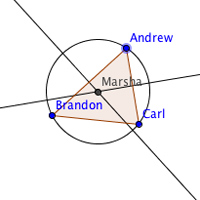
    I loved watching the circles and triangles dance. From that I saw that when my point “Marsha” is on each of the sides, it appears she’s on the midpoint.
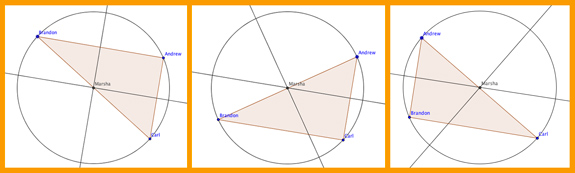
    But I wasn’t answering any questions about it. I followed the instructions to draw the triangle and the circle. And then I played.

    There were no leading questions. Nothing I had to “get right.” I just had fun.

    Try it in class.

    Suppose you gave your kids exactly what I had – instructions to draw the circumcircle and how to use the Move Tool.

    And left it at that.

    Would some students discover the hypotenuse/center thing?

    Sure!

    Would other students not?

    Yepper!

    And that’s okay.

    I’d never heard of a circumcircle. I know “circumscribed” – but not circumcircle or circumcenter. And I’m doing pretty well mathematically.

    If a child discovers something, that’s a win. If they don’t – well that’s NOT a loss! Let it go.

    It’s not your job to discover it for them. No matter what the Common Core Standards or TEKS say.

    See what happens…

    Restructure your lesson plans. See if you can give lots of different “how-to” sheets on drawing stuff on GeoGebra. And see where their curiosity takes all of you. You just might be surprised!

    Share your thoughts in the comments or on Twitter/X.

    You might also like:
  • GeoGebra – Overcoming the Fear

    GeoGebra – Overcoming the Fear

    This is the 5th in the draft purge series where I’m throwing stuff out over a three week period.
    One month after starting MathFour.com, I came across an article about GeoGebra. I was quite taken by the software, but a little overwhelmed.

    I’m not much into technology – at least when it comes to math. So the power of the tool was much more inhibiting for me than it was empowering.

    So the review of it stalled.

    Indeed this article was first “drafted” back in March of 2011 – more than a year ago. It only had the link to that article in it. Not much of a draft.

    Lucky for us, math is math. It doesn’t change much over a year (or even a few hundred years).

    So GeoGebra is pretty much as useful (and as scary) as it was a year ago.

    But like all good heros, leaders and people stupid enough to think they might be either, I’m diving in. Regardless of my fear.

    First: Get out the users’ manual.

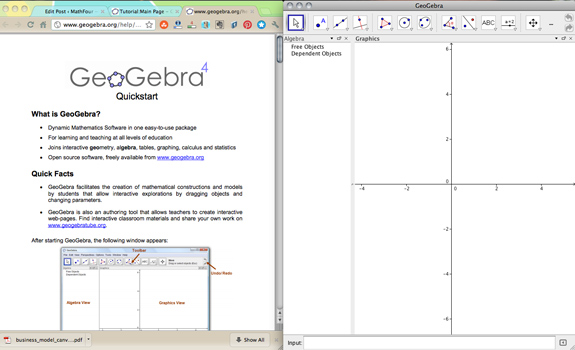
    So I found the GeoGebra Quickstart guide and started reading. I downloaded GeoGebra and cranked it up.

    The Quickstart has three examples to try. The first one is un-intimidating – merely involving a triangle and a circle.

    So I did it.

    And I can share it, too!

    Turns out you can “share” your work on GeoGebra – those guys are pretty clever, I must say!

    Click here to see my first ever attempt at GeoGebra goodies. Notice I named my triangle vertices and the center of the circle with real names – fun!

    The Circle Triangle Dance

    Following the directions, I learned about the Move Tool. Which means you can move just about anything – the whole triangle, the circle or any of the vertices!

    Check out the “dance” I did with my circle and triangle:

    I’m looking forward to playing some more. But I still have my concerns.

    I’ll share those tomorrow. For now, I’m just going to enjoy the tool!

    How about you?

    Have you played with GeoGebra? Will you? How do you use it? Tell us in the comments.

    Don’t forget to tweet it out, too!

    You might also like:
  • Education vs. Technology – One Advances and the Other Doesn't

    Education vs. Technology – One Advances and the Other Doesn't

    Wil, the research guy, notices how technology has advanced, but education is being left behind.

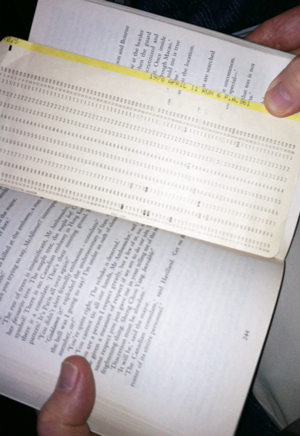
    While on vacation recently, I met an English professor who was using a 70s era computer programming punched card as a book mark.

    During a brief exchange, he said “Forty years ago we never imagined we’d have things like this,” pointing to my iPhone.

    What struck me was the manner in which he offered anecdotes of the days in which they were still in use. He didn’t imply loss or anger. He didn’t express any resentment for discontinuing the now antiquated and obsolete programming medium.

    On the contrary, he jovially stated, “Now, I use them as bookmarks and my wife uses them for her grocery lists.” Talk about recycling!

    Embracing change.

    I began to wonder why advances in technology have been embraced so well and completely, and why we are still in the “punched card” age of education.

    Many “upgrades” to effective learning are not universally applied… yet.

    For a considerable number of our public schools, we still approach the teaching-learning interaction in a way that is decidedly contrary to what research has not only indicated, but has, in many cases, shown to be true.

    It’s not just data transfer.

    Some still believe that education means opening the knowledge portal of students (whatever age) and simply depositing information. This is unrealistic and grossly simplified. Education – learning – must be received more than it can be given.

    Let them lead.

    Autonomous students not only having a say in what they engage but to a large degree feel their education is self-directed. This has a huge impact on their motivation, level of focus and ultimately how much they learn.

    Support with information, and don’t forget the “Way to go!”

    Research has provided us with concepts such as scaffolding to help children with mastery.

    Less acknowledged and utilized (perhaps due to less educator proficiency) has been emotional support and encouragement. But this is just as important in a child’s education.

    You may have the best information in the world for how to do something. But if the student is disengaged, it’s just not going to happen.

    Start with a conducive learning environment.

    This could be a post all by itself. The jist: it’s less about giving something, and more about ensuring the student is engaged. So the educational paradigm must focus on how we can facilitate the student’s learning, whatever that looks like.

    This means focusing on the student and HOW they learn right now. Instead of “he just needs to pay attention” or “she needs to work harder”.

    Back to the punched cards.

    We’ve been given these specifics that have been presented to us over and over in the research. They are being applied with successful and definitive results. So why are we resistant? And who are the “we” we are talking about?

    Look at the inevitable and constant changes in technological advances. Now consider the stagnant, upgrade-resistant public educational system. What’s the difference?

    What you can do.

    Be informed. Ask questions. Request and support educational “upgrades” in your schools.

    You and your children are the customers. Only you can create the demand for improvements in your child’s education.

    Have a voice. Be the squeaky wheel. And support schools when they move in that direction.

    They may already be doing so. If they are, let them know this is what you want.

    For more on how to support your schools in embracing conducive learning environments, contact us or leave a comment.

    Related articles